
AI Built to Amplify Creativity
Flex AI is your built-in creative collaborator in Ceros, helping you brainstorm, automate tedious tasks, and stay in flow so you can ship faster.
Ready to scale?
Pay as you go
Package pricing
Pay only for what you use. Start free, scale seamlessly, and never worry about hidden fees or lock-in contracts.
Free
Free
✦ 10,000 credits
Growth
$250
✦ 25,000 credits
Business
$500
✦ 50,000 credits
Enterprise
$1,000
✦ 100,000 credits
Scale
$2,500
✦ 250,000 credits
Essentials
Pay as you go
✦ 10,000 free credits every month
✦ Pay directly in app
✦ Purchased credits never expire
✦ Secure payments with Stripe™
Starter
In-app bundles include
✦ $100 for 10,000 credits
✦ $250 for 25,000 credits
✦ $500 for 50,000 credits
✦ $1000 for 100,000 credits
✦ $2500 for 250,000 credits
Free
Free
✦ 10,000 credits
Growth
$250
✦ 25,000 credits
Business
$500
✦ 50,000 credits
Enterprise
$1,000
✦ 100,000 credits
Scale
$2,500
✦ 250,000 credits
Essentials
$5K
5% bonus credits
✦ 525,000 credits
✦ ~$9.5K/1M credits
Starter
$10K
10% bonus credits
✦ 1.1m credits
✦ ~$9.1K/1M credits
Starter
$25K
15% bonus credits
✦ 2.875m credits
✦ ~$8.7K/1M credits
Scale
$50K
18% bonus credits
✦ 5.9m credits
✦ ~$8.5K/1M credits
Enterprise
$100K+
22% bonus credits
✦ 12.2m+ credits
✦ ~$8.2K/1M credits
Need help understanding credit usage? Check out our Educate article.
How do credits work?
Pay only for what you use. Start free, scale seamlessly, and never worry about hidden fees or lock-in contracts.
Free
Free
✦ 10,000 credits
Growth
$250
✦ 25,000 credits
Business
$500
✦ 50,000 credits
Enterprise
$1,000
✦ 100,000 credits
Scale
$2,500
✦ 250,000 credits
10,000 credits, every month, on us
Every Ceros workspace automatically receives 10,000 credits ($100 value) on the 1st of each month. No setup required.
Credit usage scales with complexity
Credit costs depend on the length of your prompt, the complexity of the task, and how much content Flex AI needs to build.
Add more credits when you need them
Flex AI pauses when credits run out — no overages. Account owners can add credits in-app by credit card up to $2.5k, or by invoice through your CSM.
Start with $100 in free credits every month. Need more? Purchase up to $5K in-app or contact us for one of our enterprise packages above.
A few examples
Pay only for what you use. Start free, scale seamlessly, and never worry about hidden fees or lock-in contracts.
Free
Free
✦ 10,000 credits
Growth
$250
✦ 25,000 credits
Business
$500
✦ 50,000 credits
Enterprise
$1,000
✦ 100,000 credits
Scale
$2,500
✦ 250,000 credits
Alt text for images
Prompt: "Create alt text for all images on the page"
Added alt text to 12 images on the page
Credits used: ~50
Manual time: ~30 min
With Flex AI: ~2min
Full accessibility review
Prompt: "Review the page for alt text, header structure, and aria-labels."
Added alt text, aria labels, and header tags
Credits used: ~500
Manual time: ~3 hours
With Flex AI: ~5min
Build a pricing page
Prompt: "Build a pricing page with hero, package tiers, credit explainer, examples, and FAQs."
Built this complete pricing page from scratch
Credits used: ~3,500
Manual time: ~3 days
With Flex AI: ~15min
Start with $100 in free credits every month. Need more? Purchase up to $5K in-app or contact us for one of our enterprise packages above.
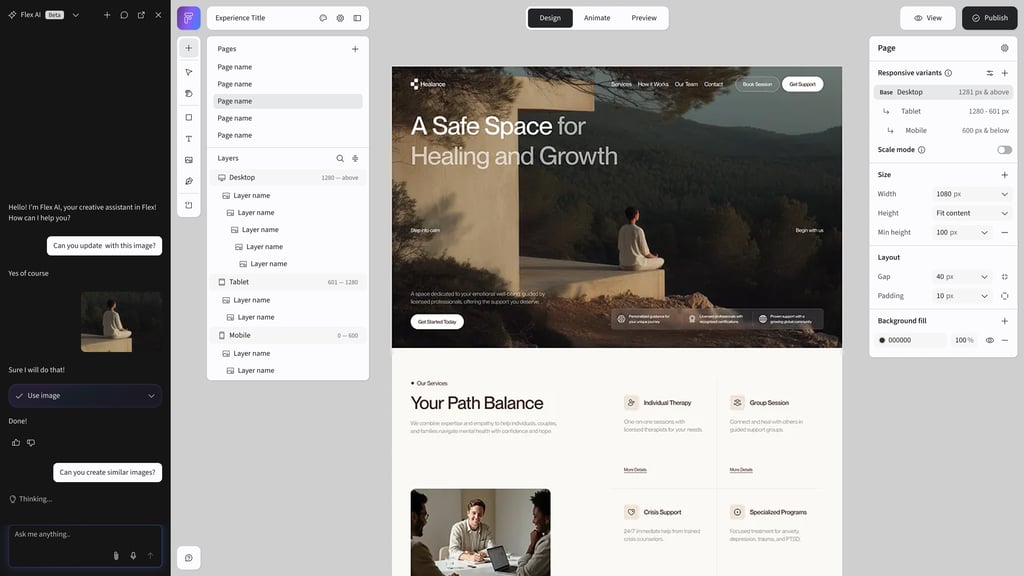
Spend Less Time on Tasks.
More Time Being Creative.
Flex AI handles the time-consuming work so you can focus on what matters; exploring ideas, pushing boundaries, and creating something extraordinary.
Rename Layers
Instantly rename all layers with intelligent, descriptive names based on content.
Translate
Translate every text element into any language in one click.
Alt Tags
Auto-generate descriptive alt text for every image in your experience.
Duplicate & Adapt
Clone content and remix it into fresh new variations instantly.
Fix Accessibility
Review and fix A11Y issues across your entire experience automatically.
Refine Copy
Select any text layer, or multiple, to refine, rewrite, or shift the tone on the spot.
Rebrand Components
Apply new brand colors, fonts, and styles to any component in seconds.
Rebrand Sections
Transform an entire section to match a new brand identity with one prompt.
Edit Images
Modify, enhance, or transform any image with natural language prompts.
Generate Images
Create custom images from text descriptions right inside your canvas.
Generate Videos
Create video content from a still image with AI-powered generation.
Remove Background
Instantly remove backgrounds from any image with one click.
Build Landing Pages
Generate a complete, on-brand landing page from a single prompt.
Build Presentation
Create interactive presentations that go beyond static slides.
Create Carousels
Build interactive carousels and galleries with navigation built in.
Create Galleries
Build image galleries, responsive grids, or fully custom visual layouts with ease.
Make Responsive
Adapt components for tablet and mobile breakpoints automatically.
Bulk Style Updates
Change fonts, colors, or styles across multiple elements at once.
Bulk Animations
Describe animation styles once and apply them across layers or groups.
Add ARIA Labels
Add semantic ARIA labels to icons and interactive elements for screen readers.
Generate Sections
Create hero sections, feature grids, CTAs, and more from a description.
Start with a Screenshot
Drop in a reference image and have it rebuilt as a working wireframe.
Explore Ideas
Brainstorm creative directions and get inspired with AI suggestions.
Working Sessions
Collaborative sessions where AI helps you iterate and refine throughout the creation process.
Spend Less Time on Tasks.
More Time Being Creative.
Flex AI handles the time-consuming work so you can focus on what matters; exploring ideas, pushing boundaries, and creating something extraordinary.
Where Flex AI shows up in everyday workflows
From campaign kickoffs to design production, Flex AI removes the work that slows teams down.
The blank page
The production pile
The brand risk
Explore Ideas
Brainstorm creative directions and get inspired with AI suggestions.
Working Sessions
Collaborative sessions where AI helps you iterate and refine throughout the creation process.
Generate Sections
Create hero sections, feature grids, CTAs, and more from a description.
Build Landing Pages
Generate a complete, on-brand landing page from a single prompt.
Build Presentations
Create interactive presentations that go beyond static slides.
Create Carousels
Build interactive carousels and galleries with navigation built in.
Create Galleries
Build image galleries, responsive grids, or fully custom visual layouts with ease.
Generate Images
Create custom images from text descriptions right inside your canvas.
Generate Videos
Create video content from a still image with AI-powered generation.
Generate Code
Generate custom HTML, CSS, and JavaScript snippets for embedded components.
+ A Lot More
Flex AI is always learning new capabilities to help you create faster.
Rename Layers
Instantly rename all layers with intelligent, descriptive names based on content.
Alt Tags
Auto-generate descriptive alt text for every image in your experience.
Add ARIA Labels
Add semantic ARIA labels to icons and interactive elements for screen readers.
Responsive Content
Adapt components for tablet and mobile breakpoints automatically.
Bulk Updates
Change fonts, colours, or styles across multiple elements at once.
Duplicate & Remix
Clone content and remix it into fresh new variations instantly.
Edit Images
Modify, enhance, or transform any image with natural language prompts.
Remove Background
Instantly remove backgrounds from any image with one click.
Add Animations
Apply scroll, hover, and entrance animations to bring your content to life.
Translations
Translate every text element into any language in one click.
Rebrand Components
Apply new brand colours, fonts, and styles to any component in seconds.
Rebrand Sections
Transform an entire section to match a new brand identity with one prompt.
Critique & Feedback
Get AI-powered design critiques and actionable feedback on your work.
Frequently Asked Questions
How do credits work?
+
Every AI-powered action in Flex — from generating images to building full pages — uses credits. Simple tasks like renaming layers or adding alt tags use fewer credits, while complex tasks like building a full experience use more. Your monthly plan includes a set number of credits that refresh each billing cycle.
What happens if I run out of credits?
+
You'll never have to worry about hitting a wall. You can purchase additional credits anytime through the Ceros Admin. You can also enable auto-top-up so your account is automatically replenished before you run out. Or upgrade to a higher tier for more credits and better per-credit pricing.
Do unused free credits roll over?
+
No. Monthly free credits do not roll over, your free credit balance resets at the start of each billing cycle. Annual prepaid credits are available for the full contract term.
How can I track my credit usage?
+
You can monitor your credit balance directly within the Flex AI interface, or within the AI Usage tab within the Setting panel of Admin. A credit usage indicator shows your remaining credits and consumption in real-time, so you always know where you stand.
How many credits does a task use?
+
It varies depending on complexity. Simple tasks like renaming layers or adding alt tags use just a handful of credits. Generating an image or translating content uses more. Building an entire section or page uses the most. For reference, this entire pricing page was built using Flex AI and used approximately 3,500 credits. For more info on credit usage, check out our Educate article.
Will credits be based on a user or workspace?
+
Workspace. Credits are allocated at the workspace level, meaning all users within a workspace share from the same credit pool. This makes it easy to manage usage across your team without worrying about individual limits.
Who can add or purchase credits?
+
Only Account Owners can purchase credits. This ensures that credit spending is managed by authorized team members, giving your organization full control over AI usage and billing.
Want to Learn More?
Reach out to your account manager or contact us directly to discuss how Flex AI can fit your workflow.
© 2026 Ceros. All rights reserved.
Privacy Policy
Terms of Service
Contact